




Accepting payments at the time of booking is no longer optional for modern WordPress websites. Whether you run a hotel, consulting service, event platform, or appointment-based business, allowing customers to pay online instantly removes friction and increases confirmed bookings.
Fortunately, WordPress makes it easier than ever to accept online payments directly from your booking forms. With the right plugins and payment gateways, you can securely collect payments through credit cards, digital wallets, or other global payment methods while automating confirmations and reservations.
In this blog post, you will learn how to accept online payments for bookings in WordPress, the tools you need, and the best way to set up a smooth and secure payment experience for your customers.
Why Online Payment for Bookings Matters
When users can reserve a service but delay payment, many bookings remain unconfirmed. Businesses then spend time chasing customers for payment or dealing with last-minute cancellations.
Accepting payments during the booking process solves this problem.
First, it guarantees that every reservation is genuine. When customers pay upfront, they are far more likely to show up or follow through.
Second, it automates your workflow. Instead of manually confirming reservations and collecting payment later, the system handles everything instantly.
Third, it improves customer experience. Modern users expect seamless checkout and instant confirmation. If your website supports quick booking and payment in one step, it builds trust and professionalism.
For many service businesses, enabling online booking payments can significantly increase revenue.
What You Need to Accept Booking Payments in WordPress
Before setting up payments, there are three essential components you need.
1. WordPress Booking Plugin
A booking plugin allows users to choose dates, time slots, or services. It creates the booking form and manages reservations from your dashboard.
Popular booking plugins include tools designed for appointments, events, rentals, and service bookings.
2. Payment Gateway
A payment gateway processes the customer’s payment securely. It connects your booking form with payment providers.
Common gateways include:
- Stripe
- PayPal
- Square
- Razorpay
- Mollie
These services allow customers to pay using credit cards, debit cards, and digital wallets.
3. SSL Security
Your website must have SSL enabled so payments are encrypted and secure. Most hosting providers offer free SSL certificates through Let’s Encrypt.
Without SSL, payment gateways will not allow transactions.
How to Accept Online Payments for Bookings in WordPress: The Steps
Here are the steps to make a way to accept online payments for bookings in WordPress.
Step 1: Install a Booking Plugin
The first step is installing a booking plugin that supports payment integration.
From your WordPress dashboard:
- Go to Plugins
- Click Add New
- Search for a booking plugin
- Install and activate it
Once installed, you can create booking forms where users select dates, time slots, services, or packages.
A good booking plugin should support:
- Appointment scheduling
- Service listings
- Calendar availability
- Email confirmations
- Payment integration
After activation, configure your booking settings such as time slots, booking limits, and service durations.
Step 2: Create Your Booking Form
Once the plugin is installed, the next step is creating the actual booking form that customers will use.
The form typically includes:
- Customer name
- Email address
- Service selection
- Booking date
- Time slot
- Total price
Many booking plugins allow you to create multiple services or packages with different pricing. For example:
- Consultation – $50
- Online coaching – $100
- Full service package – $250
These options automatically update the price during booking.
After creating the form, place it on any page using a shortcode or block.
For example:
- Booking page
- Service page
- Landing page
This allows customers to book directly from the page they visit.
Step 3: Connect a Payment Gateway
After your booking form is ready, you need to connect a payment gateway.
Most plugins support integrations with:
- Stripe
- PayPal
- Square
To connect a gateway:
- Go to the plugin’s Payment Settings
- Select your preferred payment gateway
- Add API keys or credentials
- Save settings
These credentials come from your payment provider dashboard.
For example, Stripe provides Publishable Key and Secret Key which connect your website with Stripe’s payment system.
Once connected, customers will see payment options directly during the booking process.
Step 4: Enable Payment During Booking
Now configure the system so payment happens immediately after a user selects a booking.
Most booking plugins allow two payment options:
- Full payment at booking
- Partial payment or deposit
Full payment confirms the reservation immediately.
Deposit payments allow customers to reserve a slot while paying the remaining balance later.
Choose the option that works best for your business model.
After enabling payments, test the booking process to ensure the workflow looks like this:
- Customer selects service
- Customer selects date and time
- Customer enters personal details
- Customer completes payment
- Booking confirmation is sent
This seamless flow significantly increases booking completion rates.
Step 5: Set Up Email Confirmations
Automated notifications keep both you and your customers informed.
Once payment is completed, the system should automatically send confirmation emails.
Typical notifications include:
- Booking confirmation for customers
- Payment receipt
- Admin notification of new booking
- Reminder before appointment
These automated emails reduce manual communication and create a professional booking experience.
Step 6: Test the Entire Booking and Payment Process
Before launching your booking system publicly, testing is critical.
Most payment gateways offer sandbox mode or test payments.
Use this to simulate bookings and confirm:
- Payments process correctly
- Booking confirmation emails work
- Reservations appear in your dashboard
- Dates and time slots update automatically
Testing ensures there are no issues when real customers begin using your system.
Best Payment Gateways for WordPress Booking Sites
Choosing the right payment gateway can improve reliability and global accessibility.
1. Stripe
Stripe is one of the most popular payment solutions for WordPress websites. It supports credit cards, Apple Pay, Google Pay, and dozens of currencies.
It is ideal for global businesses and subscription services.
2. PayPal
PayPal remains one of the most trusted online payment systems. Many users prefer paying through PayPal because it does not require entering card details on your site.
It works well for international transactions.
3. Square
Square is widely used by service businesses and integrates both online and in-person payments.
If you run both physical and online bookings, Square can unify payments.
Tips to Increase Booking Conversions
Simply enabling payments is not enough. Optimizing your booking flow can significantly increase conversions.
- Keep your booking form simple. Only ask for essential information so customers complete the process quickly.
- Display clear pricing before checkout so users know what they are paying.
- Offer multiple payment options to accommodate different customer preferences.
- Use automated reminders to reduce missed appointments.
These small improvements can make your booking system far more effective.
Accept Online Booking Payments Easily with Easy Hotel Booking Plugin
If you run a hotel, resort, guest house, or vacation rental website, using a specialized booking plugin can simplify the entire payment process. One powerful option designed specifically for accommodation businesses is the Easy Hotel Booking plugin.
Easy Hotel Booking allows you to create a complete hotel reservation system directly inside your WordPress website. Instead of relying on third-party booking platforms, you can manage room availability, pricing, reservations, and payments from a single dashboard.
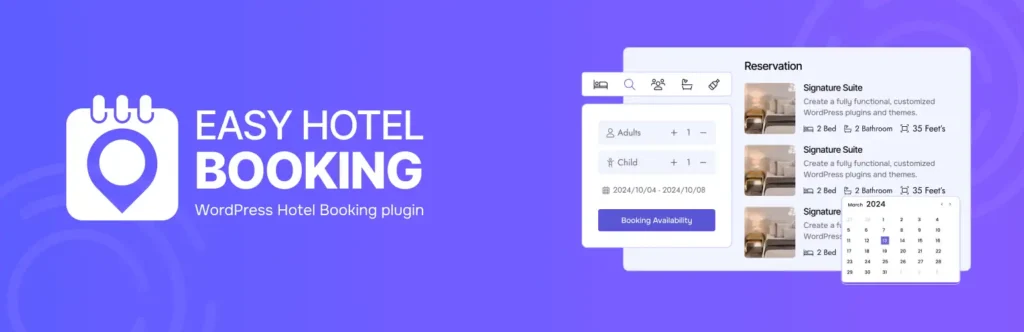
The plugin lets visitors check room availability, select check-in and check-out dates, choose room types, and complete the booking instantly. Once a room is selected, customers can proceed to secure online payment, ensuring that reservations are confirmed immediately.
One of the biggest advantages of Easy Hotel Booking is its seamless integration with popular payment gateways such as Stripe and PayPal. This means guests can pay using credit cards or digital wallets without leaving your website. Secure payment processing ensures trust while helping hotel owners receive payments quickly.
Another standout feature is the automated reservation workflow. When a guest completes a booking and payment, the system automatically updates room availability, records the reservation in your dashboard, and sends confirmation emails to both the guest and the hotel administrator. This eliminates manual work and prevents double bookings.
The plugin also supports flexible pricing, allowing you to set different rates for room types, seasonal pricing, or special packages. Combined with built-in booking calendars and availability management, it gives hotel businesses full control over their reservations.
For hotel owners who want to accept online payments for room bookings without relying on external booking platforms, Easy Hotel Booking offers a simple yet powerful solution inside WordPress. It helps turn your website into a fully functional hotel reservation system while keeping the entire booking and payment experience smooth for your guests.
Final Thoughts
Accepting online payments for bookings in WordPress transforms how service businesses operate. Instead of manually confirming reservations and collecting payments later, everything happens automatically in one smooth workflow.
By using a booking plugin, connecting a reliable payment gateway, and enabling secure checkout, you can create a professional booking experience that customers trust.
Once set up, your WordPress site becomes more than just a website—it becomes a fully automated booking and payment system that saves time, reduces cancellations, and increases revenue.