


WooCommerce runs a huge slice of the web’s online stores, and there’s a good reason for that: you can launch one in an afternoon. Install the plugin, pick a theme, add a payment gateway, and you’re selling.
But there’s a gap nobody talks about — the distance between a store that’s installed and a store that’s built right. That gap is where revenue leaks out, page speed dies, and “simple” feature requests turn into week-long firefights.
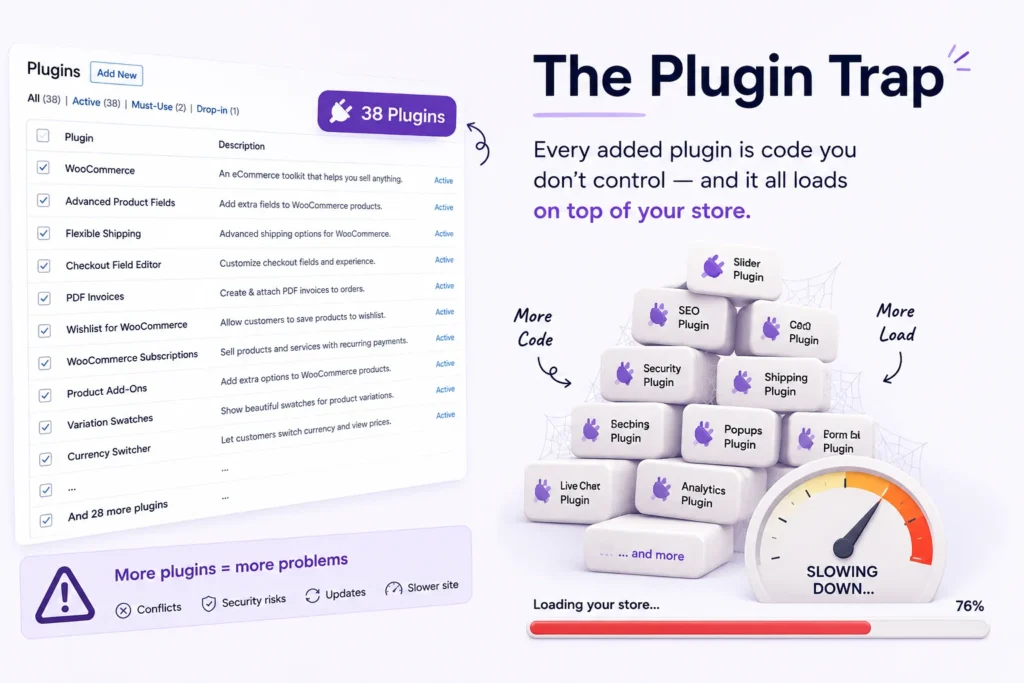
After years of building and rescuing WooCommerce stores, I can tell you the pattern is almost always the same. A store starts lean and fast. Then the business grows, the requirements pile up, and the owner reaches for the only tool they know: another plugin. Six months later they’re running 38 plugins, the checkout takes nine seconds to load, and nobody’s sure which plugin does what.
Let’s talk about how WooCommerce development actually works — and how to avoid that fate.
The Plugin Trap
Plugins are brilliant for what they’re designed to do. The problem starts when you use them to force behavior they were never built for.
Need a custom field on a product? There’s a plugin. Need conditional shipping? Plugin. Need a tweak to that plugin’s behavior? A second plugin to patch the first one.
Every plugin you add is code you don’t control, loading on every page, querying the database, and potentially conflicting with the next one. Three real costs stack up fast:
- Performance. Each plugin adds scripts, styles, and database queries. Most load on every page whether they’re needed or not.
- Fragility. When one plugin updates, it can break another. Now your store’s stability depends on a dozen unrelated developers’ release schedules.
- Ceiling. Eventually you hit a wall a plugin simply can’t climb — a workflow specific to your business that no off-the-shelf tool anticipated.
That wall is the moment WooCommerce development stops being “configuration” and becomes real engineering.
What WooCommerce Development Actually Covers
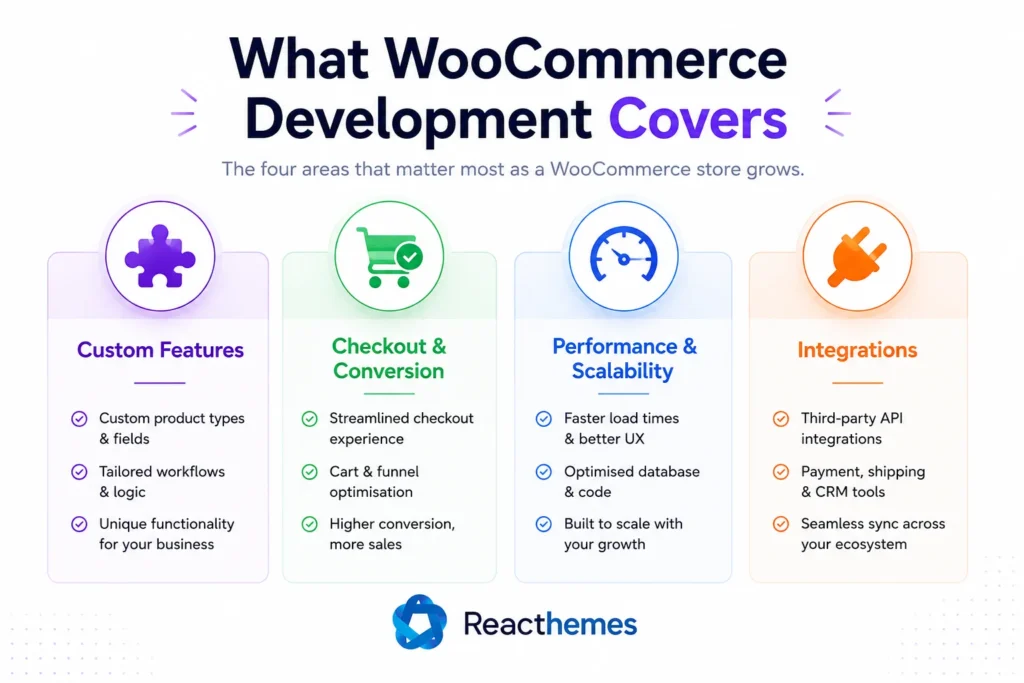
“WooCommerce development” is a broad term. In practice, it breaks down into four areas that matter for a growing store.
1. Custom Features Built Around Your Logic
This is the big one. Off-the-shelf plugins solve generic problems. Your business has specific ones — a bespoke pricing model, a multi-step product configurator, a wholesale tier with its own rules, a booking flow, a subscription quirk no plugin handles cleanly.
Custom development means building exactly that feature, tailored to how your store works, with no bloat and nothing you don’t need. Done properly, it uses WooCommerce’s own hooks and filters rather than hacking core files — so it survives updates and stays maintainable.
2. Checkout & Conversion Optimization
The checkout is where money is made or lost. Every extra field, every redirect, every second of load time costs you completed orders.
Serious WooCommerce work here means streamlining the flow, removing friction, adding the right trust signals, and sometimes rebuilding the checkout entirely for a smoother experience. This is the difference between a store that converts visitors and one that just collects abandoned carts.
3. Performance & Scalability
A store with 50 products behaves nothing like a store with 50,000. Queries that were instant become slow. The cart fragments AJAX calls pile up. Page speed tanks, and with it your Core Web Vitals and SEO.
Real performance work — query optimization, smart caching, object caching, image and asset handling, database cleanup — is what keeps a store fast as it grows, not just on launch day.
4. Integrations
Your store rarely lives alone. It needs to talk to a CRM, an ERP, a fulfillment service, an email platform, a custom payment gateway, or an accounting system. Wiring these together reliably — so orders flow automatically and data stays in sync — is core WooCommerce development work, and it’s where a lot of DIY setups quietly fall apart.
How to Tell You’ve Outgrown Plugins
You don’t need a developer for everything. But here are the honest signs you’ve crossed the line:
- You’re running so many plugins you’ve lost track of what each one does.
- Your store gets noticeably slower with every feature you add.
- A feature you need “almost” exists in a plugin, but you keep bending your business around its limitations instead of the other way around.
- A plugin update has broken your site more than once.
- You’re paying for five overlapping plugin subscriptions to do what one custom feature could handle.
- Your checkout has visible friction and your abandonment rate shows it.
If two or more of these sound familiar, you’re past the point where adding plugins helps. You’re now adding risk.
The Right Way to Build (and Why It Matters)
Here’s the part that separates a quick freelancer fix from professional WooCommerce development: good code never touches what it shouldn’t.
Proper WooCommerce work is built on hooks and filters — WordPress’s official extension points — so customizations layer cleanly on top of WooCommerce rather than editing its core. Template changes go through theme overrides, not direct edits to the plugin. Custom logic lives in a purpose-built plugin or a child theme, version-controlled and documented.
The result is a store you can actually update without fear, hand off to another developer without a headache, and scale without rebuilding from scratch. The opposite — core hacks and copy-paste snippets from random forums — works right up until the day it catastrophically doesn’t.
This is exactly the kind of thing worth getting right the first time, because untangling a badly built store costs far more than building it properly did.
DIY vs. Bringing in a Developer
Let me be straight, because not every store needs an agency.
If you’re selling a handful of simple products and the standard WooCommerce setup covers your needs — keep it simple. Use well-maintained plugins, keep your stack lean, and don’t over-engineer.
But the moment your store becomes a serious part of your revenue — when downtime costs you real money, when you need features no plugin provides, or when performance and conversions directly affect your bottom line — that’s when professional development pays for itself. The cost of doing it right is almost always lower than the cost of repeatedly patching something that was never built to scale.
If you’re at that point, this is precisely what our team does. At ReacThemes, our WooCommerce development service is built around exactly these problems — custom features designed around your business logic, conversion-focused checkout flows, and scalable architecture built for growth. We’ve shipped products used by 15,000+ users, and we back our work with a 30-day money-back guarantee.
You can explore the full range of our WordPress and WooCommerce development services here, or book a free consultation and tell us what you’re trying to build. We’ll tell you honestly whether you need custom development — or whether a simpler fix will do.
The Bottom Line
WooCommerce is one of the most powerful e-commerce platforms in the world, but its real power isn’t in how fast you can install it. It’s in how far you can take it when it’s built properly.
Plugins get you started. Engineering gets you to scale. Knowing which one you need — and when — is the single most valuable decision you’ll make about your store.
If you’ve hit the plugin ceiling and you’re ready to build something that actually grows with you, let’s talk.